
CompletedReact NativeExpoNativewind+4 more
Aora
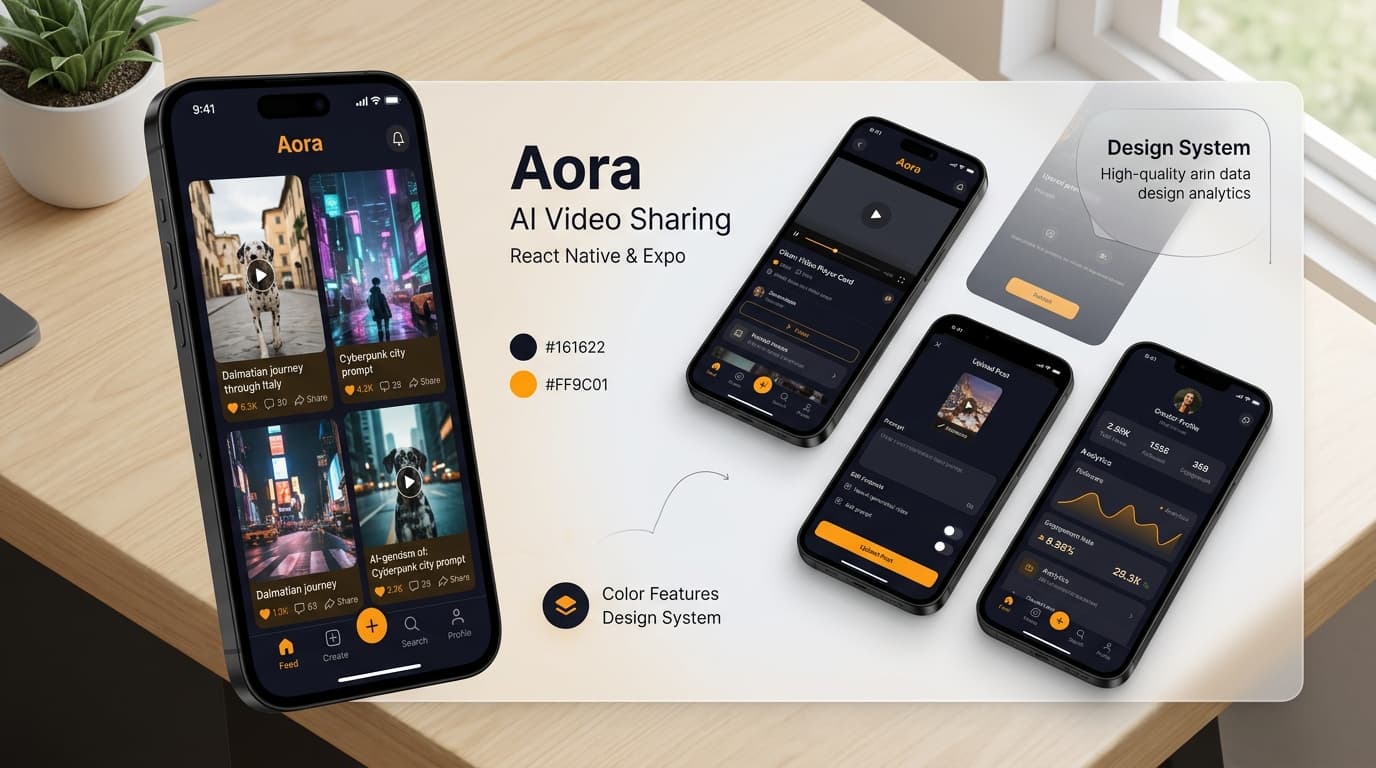
A social media video-sharing mobile platform to share AI-generated videos along with their creation prompts, built with React Native, Expo, NativeWind, and Appwrite.
Timeline
1 Month
Role
Mobile App Developer
Team
Solo
Status
CompletedTechnology Stack
React Native
Expo
Nativewind
Animatable
Appwrite
Tailwind CSS
JavaScript
Key Challenges
- Optimizing video playback and memory management in dynamic React Native FlatLists
- Designing fluid gesture-driven UI animations and micro-interactions with Animatable
- Integrating Appwrite storage buckets for multi-part video uploads and secure streaming URLs
- Configuring NativeWind styling and custom Poppins typography across iOS and Android
Key Learnings
- React Native component lifecycle, custom hooks, and Expo Router architecture
- Appwrite BaaS integration for authentication, databases, and file storage buckets
- NativeWind utility-first styling patterns tailored for native mobile views
- Video encoding, thumbnail extraction, and smooth full-text search indexing
📱 Aora: AI Video Sharing Mobile Platform
Overview
Aora is an engaging, modern mobile social media application crafted to empower creators to share captivating AI-generated videos alongside their original generation prompts. Built with React Native, Expo, NativeWind, and Appwrite, Aora brings smooth mobile performance, dynamic micro-animations, and seamless cloud media management to iOS and Android.
🎯 Key Features
🎬 AI Video Discovery Feed
- Animated FlatList: Smoothly animated video feed showcasing trending AI-generated videos with active card zoom effects.
- Prompt Overlay Preview: View the exact AI generation prompts used to create each video to inspire community creativity.
- Pull-to-Refresh Gesture: Refresh the home feed with an intuitive swipe gesture for real-time video discovery.
🔍 Full-Text Search Engine
- Instant Search Results: Query videos by prompt keywords, titles, or creator handles with live query suggestions.
- Dedicated Search View: Clean search tab displaying matching video cards and prompt highlights.
✍️ Post & Media Creation
- In-App Media Picker: Select and upload video files and custom thumbnail covers directly from device storage.
- Prompt Publishing: Tag your video with AI prompt details and descriptive titles stored securely in Appwrite.
🔐 Authentication & User Profiles
- Secure Email Auth: User registration and login powered by Appwrite Auth.
- Creator Dashboard: View personalized account stats, uploaded video collections, and follower metrics.
✨ Dynamic UI & Micro-Animations
- Animatable Library: Fluid transition effects on tab navigation, card focus, and modal dialogues.
- NativeWind & Tailwind CSS: Utility-first styling with custom dark theme colors (
#161622primary and#FF9C01secondary). - Custom Poppins Typography: Loaded asynchronously with Expo
useFontsandSplashScreen.
⚙️ Tech Stack & Architecture
Mobile Frontend
- React Native: Cross-platform native mobile application framework.
- Expo: Modern developer workflow, tooling, and native modules.
- NativeWind: Tailwind CSS styling engine tailored for React Native.
- React Native Animatable: Declarative animations and micro-interactions.
- Expo Router & React Navigation: Tab-based navigation and nested screens.
Backend & Cloud Services
- Appwrite: Backend-as-a-Service (BaaS) handling:
- Authentication: User sessions and secure login.
- Databases: Video documents, creator metadata, and prompt indexes.
- Storage Buckets: High-resolution video and thumbnail asset hosting.
🕸️ Code Architecture & Config Snippets
1. Theme Configuration (tailwind.config.js)
/** @type {import('tailwindcss').Config} */
module.exports = {
  content: ["./app/**/*.{js,jsx,ts,tsx}", "./components/**/*.{js,jsx,ts,tsx}"],
  theme: {
    extend: {
      colors: {
        primary: "#161622",
        secondary: {
          DEFAULT: "#FF9C01",
          100: "#FF9001",
          200: "#FF8E01",
        },
        black: {
          DEFAULT: "#000",
          100: "#1E1E2D",
          200: "#232533",
        },
        gray: {
          100: "#CDCDE0",
        },
      },
      fontFamily: {
        pthin: ["Poppins-Thin", "sans-serif"],
        pextralight: ["Poppins-ExtraLight", "sans-serif"],
        plight: ["Poppins-Light", "sans-serif"],
        pregular: ["Poppins-Regular", "sans-serif"],
        pmedium: ["Poppins-Medium", "sans-serif"],
        psemibold: ["Poppins-SemiBold", "sans-serif"],
        pbold: ["Poppins-Bold", "sans-serif"],
        pextrabold: ["Poppins-ExtraBold", "sans-serif"],
        pblack: ["Poppins-Black", "sans-serif"],
      },
    },
  },
  plugins: [],
};
2. Custom Font Loading (useFonts)
const [fontsLoaded, error] = useFonts({
  "Poppins-Black": require("../assets/fonts/Poppins-Black.ttf"),
  "Poppins-Bold": require("../assets/fonts/Poppins-Bold.ttf"),
  "Poppins-ExtraBold": require("../assets/fonts/Poppins-ExtraBold.ttf"),
  "Poppins-ExtraLight": require("../assets/fonts/Poppins-ExtraLight.ttf"),
  "Poppins-Light": require("../assets/fonts/Poppins-Light.ttf"),
  "Poppins-Medium": require("../assets/fonts/Poppins-Medium.ttf"),
  "Poppins-Regular": require("../assets/fonts/Poppins-Regular.ttf"),
  "Poppins-SemiBold": require("../assets/fonts/Poppins-SemiBold.ttf"),
  "Poppins-Thin": require("../assets/fonts/Poppins-Thin.ttf"),
});

useEffect(() => {
  if (error) throw error;
  if (fontsLoaded) SplashScreen.hideAsync();
}, [fontsLoaded, error]);
3. Appwrite Video Document Schema
const videoSchema = {
  title: "Get inspired to code",
  thumbnail: "https://cloud.appwrite.io/v1/storage/buckets/.../view",
  video: "https://cloud.appwrite.io/v1/storage/buckets/.../view",
  prompt: "Create a motivating AI driven video aimed at inspiring coding enthusiasts with simple language",
  creator: "$userId"
};
🤸 Quick Start & Expo Setup
Follow these steps to run the project locally or on your mobile device:
1. Prerequisites
- Node.js: Version 18+
- Git: Installed on your system
- Expo Go App: Downloaded from the App Store or Google Play
2. Clone the Repository
git clone https://github.com/Souvik-223/aora.git
cd aora
3. Install Dependencies
npm install4. Start the Expo Server
npm start5. Launch on Mobile Device
Open the Expo Go app on your phone, scan the QR code printed in your terminal, and enjoy exploring Aora!