
Orca Stream
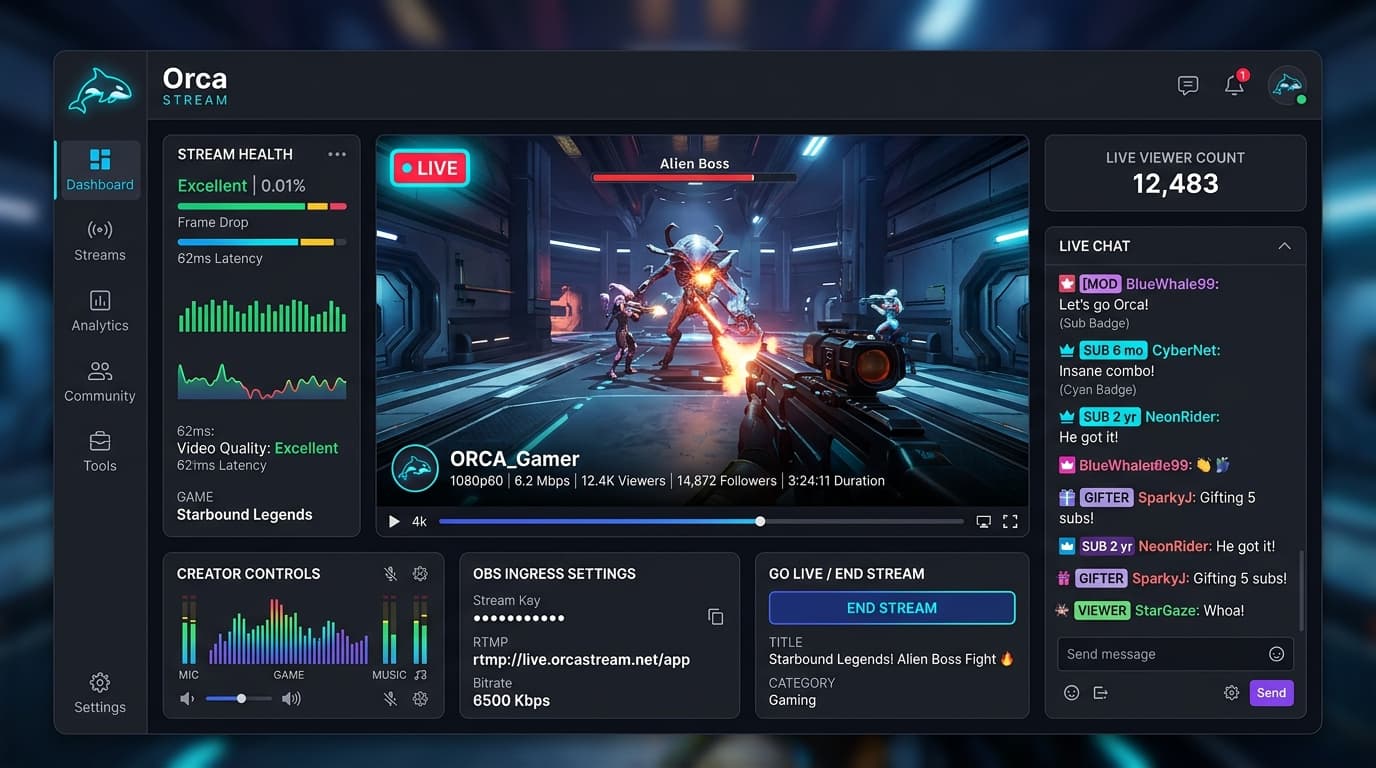
A fullstack open-source streaming platform like Twitch with real-time video broadcasting (RTMP/WHIP), interactive WebSocket chat, streamer dashboard, and community controls.
Timeline
2 Months
Role
Full Stack Developer
Team
Solo
Status
CompletedTechnology Stack
Key Challenges
- Integrating LiveKit RTMP/WHIP protocol ingress for ultra-low latency OBS streaming
- High-throughput WebSocket chat room state with custom badge rendering and rate-limiting
- Managing bidirectional moderation events (real-time kick, mute, slow-mode, and blocking)
- Dynamic stream health metrics, live viewer tracking, and automated DB webhook synchronization
Key Learnings
- LiveKit WebRTC/RTMP media server orchestration and ingress token generation
- Socket.io rooms, namespaces, and event-driven chat architectures in Next.js
- Prisma ORM advanced relational modeling with MySQL for social graphs and streams
- Clerk webhook authentication and synchronization with internal user records
- Next.js 14 App Router server components, route groups, and streaming layouts
🎥 Orca Stream: Fullstack Live Streaming Platform
Overview
Orca Stream is a production-grade, full-stack live streaming platform inspired by Twitch. Built end-to-end with Next.js 14, LiveKit, Socket.io, and MySQL, it provides a complete broadcasting ecosystem for streamers and viewers—supporting real-time video ingestion over RTMP/WHIP protocols, interactive live chat, dynamic streamer dashboards, and rich community moderation tools.
🚀 Key Features
📡 Real-Time Broadcasting & Ingress
- RTMP & WHIP Protocols: Low-latency live video streaming powered by LiveKit.
- OBS Studio Integration: Instant generation of unique ingress stream keys and RTMP server URLs for seamless broadcasting from OBS, Streamlabs, or custom encoders.
- Dynamic Stream Health: Live status indicators, stream bitrate tracking, and automatic thumbnail updates.
- Real-Time Viewer Counting: Instant live viewer presence and concurrency telemetry.
💬 Interactive Live Chat
- WebSocket Chat Engine: High-performance, real-time messaging powered by Socket.io.
- Viewer Customization: Custom badge rendering and unique viewer username colors in the chat stream.
- Chat Moderation Modes:
- 🐢 Slow Chat Mode: Throttles message frequency to prevent spam during high-volume broadcasts.
- 🔒 Followers-Only Mode: Restricts chat participation to verified channel followers.
- 📴 Chat Toggle: Streamers can enable or disable chat globally at any time.
🎛️ Streamer / Creator Dashboard
- Ingress Key Management: Securely generate, view, and reset RTMP stream keys.
- Live Stream Settings: Update stream title, game/category, and custom cover thumbnails on the fly.
- Participant Moderation: Real-time kick, block, and viewer moderation controls directly from the dashboard.
👥 Social & Community Graph
- Follow & Recommendation Engine: Follow favorite channels with dedicated sidebar feeds and personalized home page recommendations (sorted by live streams first).
- Blocking System: Built-in user blocking preventing unwanted interactions across streams and chat.
- Collapsible Layout: Flexible viewing modes including theatre mode, fullscreen, and collapsible sidebars.
⚡ Performance & Architecture
- Server-Side Rendering (SSR): Full Next.js 14 App Router integration with server-rendered layouts and SEO-friendly metadata.
- Webhook Synchronization: Webhook listeners keeping Clerk authentication and LiveKit stream status synchronized with MySQL.
⚙️ Tech Stack
Frontend & Streaming
- Next.js 14: App Router, Server-Side Rendering (SSR), and route grouping.
- React 18 / 19: Component architecture and streaming UI hooks.
- TypeScript: Strict type safety across all events and schemas.
- LiveKit: WebRTC & RTMP/WHIP real-time video infrastructure.
- Socket.io: Bidirectional WebSocket communication for live chat.
- Tailwind CSS & shadcn/ui: Modern, responsive dark-mode UI.
Backend & Database
- MySQL: Relational database for users, streams, followers, and chat logs.
- Prisma ORM: Type-safe database queries and automated schema migrations.
- Clerk: Authentication, user session management, and secure webhooks.
📡 Connecting to OBS Studio
Broadcasting to Orca Stream using OBS Studio is simple:
- Navigate to your Streamer Dashboard → Keys.
- Copy your unique Stream Key and RTMP Server URL.
- Open OBS Studio → Settings → Stream.
- Set Service to
Custom..., paste the Server URL and Stream Key. - Click Apply and hit Start Streaming!
🗃️ Database Schema Overview
The relational schema is managed with Prisma ORM targeting MySQL:
model User {
  id           String    @id @default(uuid())
  username     String    @unique
  imageUrl     String    @db.Text
  externalUserId String  @unique
  bio          String?   @db.Text

  following    Follow[]  @relation("Following")
  followedBy   Follow[]  @relation("FollowedBy")
  blocking     Block[]   @relation("Blocking")
  blockedBy    Block[]   @relation("BlockedBy")

  stream       Stream?
  createdAt    DateTime  @default(now())
  updatedAt    DateTime  @updatedAt
}

model Stream {
  id           String    @id @default(uuid())
  name         String    @db.Text
  thumbnailUrl String?   @db.Text
  ingressId    String?   @unique
  serverUrl    String?   @db.Text
  streamKey    String?   @db.Text

  isLive       Boolean   @default(false)
  isChatEnabled Boolean  @default(true)
  isChatDelayed Boolean  @default(false)
  isChatFollowersOnly Boolean @default(false)

  userId       String    @unique
  user         User      @relation(fields: [userId], references: [id], onDelete: Cascade)
}
🧪 Demo Account (For Testing)
You can explore the live app directly without signing up using the demo credentials below:
- Email:
tester@test.com - Password:
Tester
[!TIP] Use this account to test live streaming ingress, chat moderation, follower features, and creator dashboard controls.
🤸 Quick Start & Local Setup
1. Prerequisites
- Node.js: Version 18 or higher
- MySQL Database: Local or hosted MySQL instance
- LiveKit Account: Free cloud API credentials for streaming
- Clerk Account: For user authentication
2. Clone the Repository
git clone https://github.com/Souvik-223/orca-stream.git
cd orca-stream
3. Install Dependencies
npm install4. Configure Environment Variables
Create a .env file in the project root:
# Database
DATABASE_URL="mysql://user:password@localhost:3306/orcastream"

# Clerk Authentication
NEXT_PUBLIC_CLERK_PUBLISHABLE_KEY=
CLERK_SECRET_KEY=
CLERK_WEBHOOK_SECRET=

# LiveKit Streaming Credentials
LIVEKIT_API_URL=
LIVEKIT_API_KEY=
LIVEKIT_API_SECRET=
NEXT_PUBLIC_LIVEKIT_WS_URL=

# App URL
NEXT_PUBLIC_APP_URL=http://localhost:3000
5. Push Database Schema
npx prisma generate
npx prisma db push
6. Run the Development Server
npm run devOpen http://localhost:3000 with your browser to start streaming!