
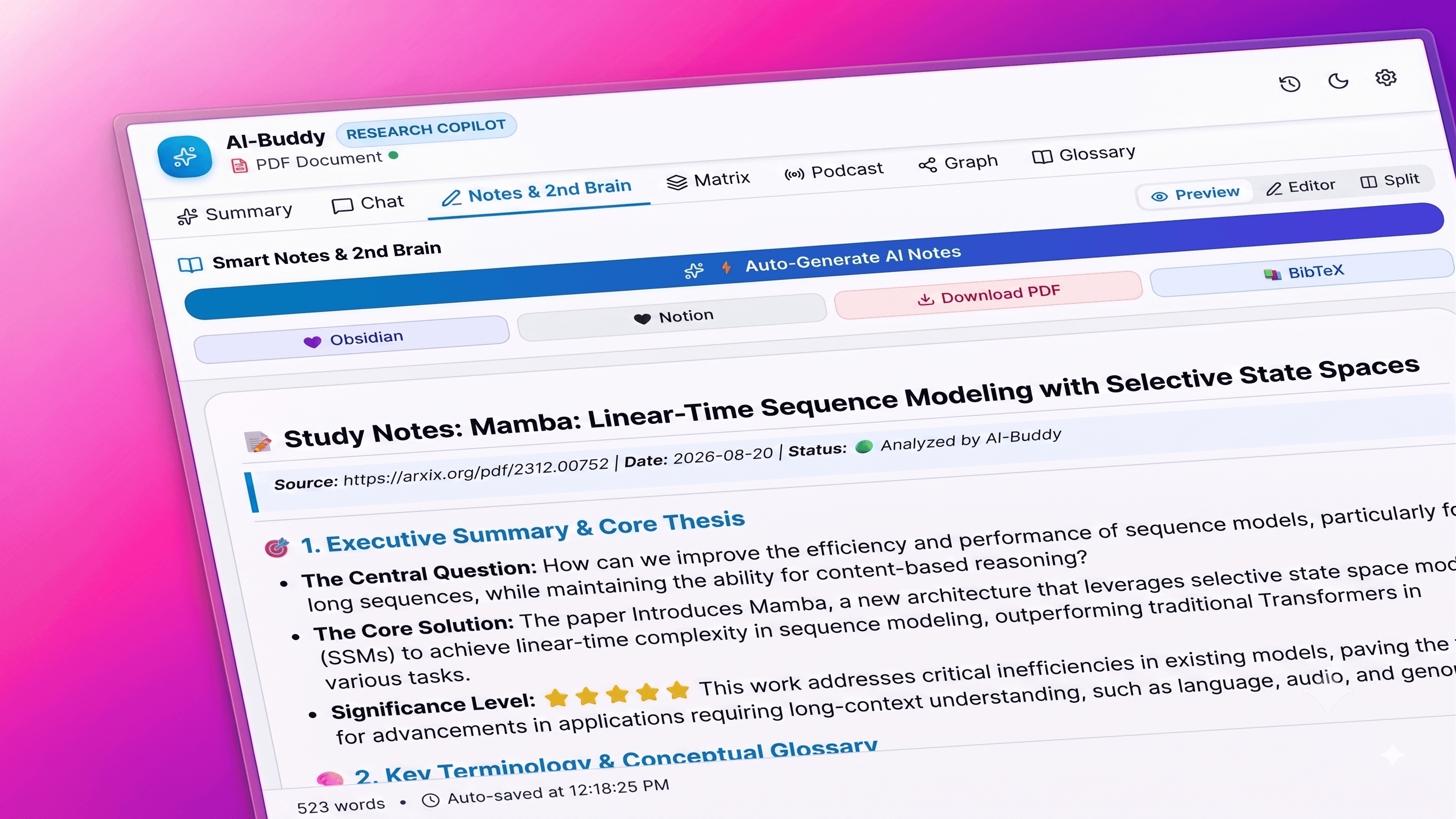
AI-Buddy
An intelligent browser copilot and high-throughput streaming backend that transforms dense research papers, academic PDFs, and web articles into structured Cornell study notes, 2-host audio podcasts, multi-tab comparison matrices, and interactive second-brain knowledge graphs with 100% private, client-side data ownership.
Timeline
3 Weeks
Role
AI Systems & Full-Stack Engineer
Team
Solo
Status
CompletedTechnology Stack
Key Challenges
- Overcoming Chrome Manifest V3 sandbox limitations when injecting content scripts into restricted academic PDF viewers and ArXiv reader tabs
- Architecting a low-latency Server-Sent Events (SSE) streaming pipeline with Hono.js on Bun for multi-model routing (Gemini 3.7 Flash & GPT-4o)
- Synthesizing multi-turn 2-host audio podcast dialogues and driving the native Web Speech API with dynamic pitch, pacing, and real-time waveform visualizers
- Designing zero-database, stateless privacy architecture ensuring notes, graphs, and summaries persist strictly in browser local storage sandbox
Key Learnings
- Chrome MV3 Service Worker lifecycle, side panel APIs, and Plasmo framework build pipelines
- High-throughput asynchronous I/O and streaming response handling with Bun and Hono.js
- Hybrid document extraction strategies combining client DOM parsing, Mozilla Readability, and serverless unpdf extraction
- Bi-directional DOM semantic text traversal and animated pulse highlighting linked to LLM citation pills
- Obsidian URI scheme protocol integration and vector PDF compilation with headless browser instances
🧠 AI-Buddy: Intelligent Research Copilot & Second Brain Ecosystem
Overview
AI-Buddy is a browser copilot and high-throughput streaming backend engineered for researchers, engineers, and students. It ingests dense research papers, academic PDFs, ArXiv preprints, and web articles, transforming them into structured Cornell notes, NotebookLM-style 2-host audio podcasts, multi-tab comparison matrices, and interactive knowledge graphs—all while preserving 100% client-side data privacy.
The system couples a Plasmo Manifest V3 browser extension (featuring React 18, Tailwind CSS, KaTeX math rendering, and a dedicated Deep Research Side Panel) with a Stateless Hono.js on Bun streaming microservice.
🏗️ Architecture & Technology Stack
AI-Buddy is engineered with a decoupled, high-concurrency architecture optimized for sub-millisecond cold starts, zero latency streaming, and client-side data isolation:
ai-buddy/
├── ai-buddy/                     # 🧩 Chrome Extension (Plasmo MV3 + React 18)
│   ├── assets/                   # Extension icons & branding
│   ├── src/
│   │   ├── components/           # UI Components & Research Workspaces
│   │   │   ├── Header.tsx        # Navigation with live backend status badge
│   │   │   ├── ModeSelector.tsx  # 6-mode summary toggle pill bar
│   │   │   ├── SummaryViewer.tsx # Markdown renderer + KaTeX + citation pills
│   │   │   ├── ChatWorkspace.tsx # Grounded multi-turn Q&A interface
│   │   │   ├── NotesWorkspace.tsx# AI Cornell notes, live editor & second brain sync
│   │   │   ├── MatrixWorkspace.tsx# Multi-tab cross-paper comparative matrix
│   │   │   ├── PodcastWorkspace.tsx# 2-host podcast generator & audio visualizer
│   │   │   ├── KnowledgeGraphView.tsx# Interactive SVG concept network graph
│   │   │   ├── AudioPlayer.tsx   # Dual-voice Web Speech controller & speed gauge
│   │   │   ├── HistoryDrawer.tsx # Searchable summary history drawer
│   │   │   └── SettingsModal.tsx # Model routing & Obsidian vault config
│   │   ├── lib/                  # Utilities & API Clients
│   │   │   ├── api.ts            # Hono SSE stream consumer + Gemini direct fallback
│   │   │   ├── extractors.ts     # In-browser DOM & hybrid unpdf extraction
│   │   │   ├── storage.ts        # Typed Chrome local/sync storage helpers
│   │   │   ├── tts.ts            # Web Speech API dual-speaker audio engine
│   │   │   └── export.ts         # Obsidian URI, Notion, PDF, & BibTeX exporters
│   │   ├── popup.tsx             # 1-Click Quick Summary popup view
│   │   ├── sidepanel.tsx         # Deep Research Split-Screen Side Panel Hub
│   │   ├── content.tsx           # Floating toolbar & DOM in-page pulse highlighter
│   │   ├── background.ts         # Service worker (Context menus & Side panel triggers)
│   │   └── style.css             # Tailwind CSS & pulse highlight animations
│   └── package.json
│
├── backend-server/               # ⚡ AI Streaming Backend (Hono.js on Bun)
│   ├── src/
│   │   ├── routes/               # Modular Hono API routes
│   │   │   ├── summarize.ts      # SSE streaming summarizer endpoint
│   │   │   ├── chat.ts           # SSE streaming document Q&A endpoint
│   │   │   ├── notes.ts          # SSE streaming smart Cornell notes endpoint
│   │   │   ├── matrix.ts         # SSE streaming multi-document matrix endpoint
│   │   │   ├── podcast.ts        # SSE streaming 2-host podcast generator
│   │   │   ├── graph.ts          # Concept knowledge graph extraction endpoint
│   │   │   ├── explain.ts        # Fast term & formula definition endpoint
│   │   │   └── extract.ts        # URL crawler & unpdf parsing endpoint
│   │   ├── services/
│   │   │   ├── ai.ts             # Multi-provider AI service (Gemini + OpenAI)
│   │   │   └── extractor.ts      # Mozilla Readability & unpdf text extraction
│   │   └── index.ts              # Hono app entry with CORS & secure headers
│   └── package.json
✨ Key Agentic & Research Features
1. 📝 AI-Automated Cornell Notes & Second-Brain Studio
- One-Click Cornell Notes Generation: Ingests multi-page papers and streams structured, comprehensive study notes covering:
- Core Problem & Executive Summary
- Key Concepts, Glossary & Mathematical Formulations (rendered with KaTeX)
- Methodology & Empirical Benchmarks
- Critical Evaluation, Biases & Open Questions
- Actionable Next Steps & Application Ideas
- Interactive Live Markdown Editor: Dual-mode (Editor / Live Preview) workspace with rapid-insertion helpers (
+ Takeaway,+ Callout,+ Formula,+ Task). - Debounced Local Auto-Save: Notes are tied to document URLs and automatically saved locally to
chrome.storage.local.
2. 💜 1-Click Second Brain Sync (Obsidian, Notion, PDF, BibTeX)
- 1-Click Obsidian Vault Sync: Uses the native
obsidian://newprotocol to create an instantly formatted note in the user's Obsidian vault with complete YAML frontmatter (title,source,date,tags: [research, paper, ai-buddy]) and backlinks ([[AI-Buddy Second Brain]]). - 1-Click Notion Sync: Copies structured Notion-compatible markdown with callouts, checkboxes, and toggle lists ready to paste into any Notion page or database.
- 1-Click Styled PDF Download: Renders a clean, publication-grade academic PDF complete with document headers, metadata bars, and typography.
- 1-Click BibTeX (.bib) Citation: Generates complete bibliographic entries for Zotero, Mendeley, and LaTeX papers.
3. 📑 Multi-Tab Comparative Matrix ("Matrix Mode")
- Open Tab Discovery: Scans all active browser tabs using
chrome.tabs.queryto discover related open papers. - Parallel Multi-Document Extraction: Extracts text across multiple ArXiv or web tabs in parallel.
- Comparative Synthesis Table: Streams a comprehensive matrix comparing:
- Core Problem & Thesis
- Proposed Methodology & Model Architecture
- Datasets, Benchmarks & Metrics
- Weaknesses, Computational Cost & Limitations
- Consensus vs. Divergent Findings
- Export Matrix: Instant one-click Markdown copy and tabular report export.
4. 🎙️ NotebookLM-Style 2-Host Conversational Audio Podcast
- Dual-Speaker Dialogue Generator: Converts dense academic papers into an engaging, 2-host conversational podcast script:
- Alex (Host 1): Curious, enthusiastic investigator who translates technical jargon into intuitive real-world analogies.
- Dr. Sarah (Host 2): Distinguished technical specialist breaking down mathematics, architecture, and empirical nuance.
- Dual-Voice Audio Player: Alternates between distinct browser neural voices with custom pitch, tone, and pacing ($0.9\times$ to $1.35\times$ speed controls) powered by the native Web Speech API without external audio API costs.
- Synchronized Live Transcript: Chat bubbles with a real-time waveform visualizer, automatically auto-scrolling to the active speaker turn.
5. 🎯 Bi-Directional In-Page Semantic Highlighting
- Deep Citation Anchor Links: Summaries and chat responses output grounded citation tags (e.g.
[[cite: "selective state space"]]). - DOM In-Page Traverser: Clicking citation pills sends a message to the content script, which smoothly scrolls the active web page to the exact text and applies an animated glowing pulse highlight (
.ai-buddy-pulse-highlight).
6. 🧠 Interactive Concept Knowledge Graph Visualizer
- Automated Entity & Relationship Extraction: The backend AI maps core concepts, models, methods, metrics, and authors into a relational graph structure.
- Interactive Visual Canvas: Renders nodes and directed edges directly in the Side Panel with zoom, pan, category color coding, and node inspection cards.
- Instant Persistence: Graph layouts and nodes are cached locally per URL.
7. 🔄 Multi-Mode Smart Summarization (6 Lenses)
- ⚡ TL;DR: 2–3 sentence executive punchline + key highlights.
- 🎯 Key Takeaways: Bullet-pointed empirical findings, statistical results, and critical arguments.
- 🔬 Deep Research Breakdown: Structured academic framework (Problem & Gap, Methodology, Key Findings, Limitations, Practical Implications).
- 💡 ELI5 (Explain Like I'm 5): Jargon-free conceptual synthesis with relatable analogies.
- 🗺️ Mindmap / Hierarchical Outline: Nested conceptual tree for rapid skimming.
- ✨ Custom Research Prompts: Run arbitrary prompt queries grounded strictly on the active document.
8. 📄 Hybrid Universal Document & PDF Ingestion
- Native & Remote PDF Ingestion: Extracts text directly from Chrome's internal PDF viewer, local PDF tabs, and remote PDF links.
- Server-Side Fallback (unpdf): When Chrome's PDF viewer restricts in-browser content scripts on ArXiv (
/pdf/) or academic URLs, AI-Buddy automatically queries the backend/api/extractengine, ingesting full multi-page papers (130,000+ characters) with zero loss. - Specialized Platform Parsers: Custom extraction strategies for ArXiv (
/abs/&/pdf/), PubMed, Medium, Substack, and Wikipedia.
🔒 Zero-Database & Stateless Privacy Architecture
AI-Buddy is engineered with a strict Privacy-First & Stateless Foundation:
┌─────────────────────────────────────────────────────────────┐
│                    Chrome Local Sandbox                     │
├──────────────────────────────┬──────────────────────────────┤
│     chrome.storage.local     │     chrome.storage.sync      │
├──────────────────────────────┼──────────────────────────────┤
│ 📜 'ai_buddy_history'        │ ⚙️ 'ai_buddy_settings'       │
│   • Up to 100 summaries      │   • Active model selection   │
│   • Search & filterable      │   • Preferred language       │
│   • Starred favorites        │   • Obsidian vault name      │
│                              │   • Dark / Light theme       │
│ 📝 'notes_${documentUrl}'    │   • Backend server URL       │
│   • Per-document notes       │                              │
│   • Auto-saved on edit       │                              │
│                              │                              │
│ 🧠 'graph_${documentUrl}'    │                              │
│   • Extracted graph cache    │                              │
└──────────────────────────────┴──────────────────────────────┘- Zero Database on Server: The backend server is completely stateless. It does not store user documents, prompts, notes, or reading histories in any database.
- Local Sandbox Storage: All research notes, summaries, and graph caches reside in your browser's private
chrome.storage.local. - Direct AI Routing: Requests flow strictly between the browser, the local backend (
:3001), and the selected AI endpoint.
🤖 Multi-Model Engine & Dynamic Routing
AI-Buddy supports both Google Gemini and OpenAI with dynamic model routing:
| Selected Model | AI Provider | API Key Used | Best For |
| :--- | :--- | :--- | :--- |
| Gemini 2.5 Flash (Default) | Google Gemini | GEMINI_API_KEY | Ultra-fast summarization, long context papers, free-tier friendly |
| Gemini 3.7 Flash | Google Gemini | GEMINI_API_KEY | Flagship speed & advanced deep reasoning on complex papers |
| GPT-4o Mini | OpenAI | OPENAI_API_KEY | Fast, cost-effective OpenAI summaries |
| GPT-4o | OpenAI | OPENAI_API_KEY | Flagship OpenAI reasoning & document synthesis |
📡 Backend API Reference
GET /health: Returns server status, runtime, and API key configuration state.POST /api/summarize: Streams real-time Server-Sent Events (SSE) for document summarization.POST /api/chat: Streams interactive conversational answers grounded in document context.POST /api/notes/generate: Streams structured Cornell-style study notes with key terms, formulas, and takeaways.POST /api/matrix: Streams cross-document comparative matrices across multiple ingested papers.POST /api/podcast: Streams 2-host conversational dialogue scripts ([Alex]: ...and[Dr. Sarah]: ...).POST /api/graph/extract: Extracts structured entity nodes and relationship edges for visual knowledge graphing.POST /api/explain: Instant definition and context explanation for highlighted terms or formulas.POST /api/extract: Extracts readable content from a given URL via Mozilla Readability, Cheerio, andunpdf.POST /api/export/pdf: Compiles Markdown, KaTeX mathematical formulas, and styled callouts into a publication-grade vector PDF using headless Chrome/Edge.
🛠️ Quick Start & Local Setup
1. Prerequisites
- Node.js: Version 18.0 or higher
- pnpm:
npm install -g pnpm - Bun:
npm install -g bunorpowershell -c "irm bun.sh/install.ps1 | iex" - API Keys: Google Gemini API Key (from Google AI Studio) or an OpenAI API Key
2. Backend Server Setup (Hono + Bun)
# 1. Navigate to backend-server directory
cd backend-server

# 2. Install dependencies with Bun
bun install

# 3. Create your environment file
cp .env.example .env
Configure backend-server/.env:
PORT=3001
GEMINI_API_KEY=your_google_gemini_api_key_here
DEFAULT_MODEL=gemini-2.5-flash
# Optional: OPENAI_API_KEY=your_openai_api_key_here
Start the backend in development mode:
bun run dev3. Chrome Extension Setup (Plasmo + React)
# 1. Navigate to extension directory
cd ai-buddy

# 2. Install dependencies with pnpm
pnpm install

# 3. Start development watcher with Hot Reloading
pnpm dev

# OR build production bundle:
pnpm build
The compiled extension is generated in:
- Dev Mode:
ai-buddy/build/chrome-mv3-dev - Production:
ai-buddy/build/chrome-mv3-prod
4. How to Load Extension into Google Chrome
- Open Chrome and navigate to
chrome://extensions. - Enable Developer mode in the top right corner.
- Click the Load unpacked button in the top left corner.
- Select the build directory:
<WORKSPACE_DIR>/ai-buddy/build/chrome-mv3-dev. - AI-Buddy is loaded and ready for research!